9.6.1 Active Directory Domain Mapping
← Stage index | LDAP/Kerberos baseline | AD cheatsheet | Master Notes | Strategy map | Study methods: Map Active Directory attack paths
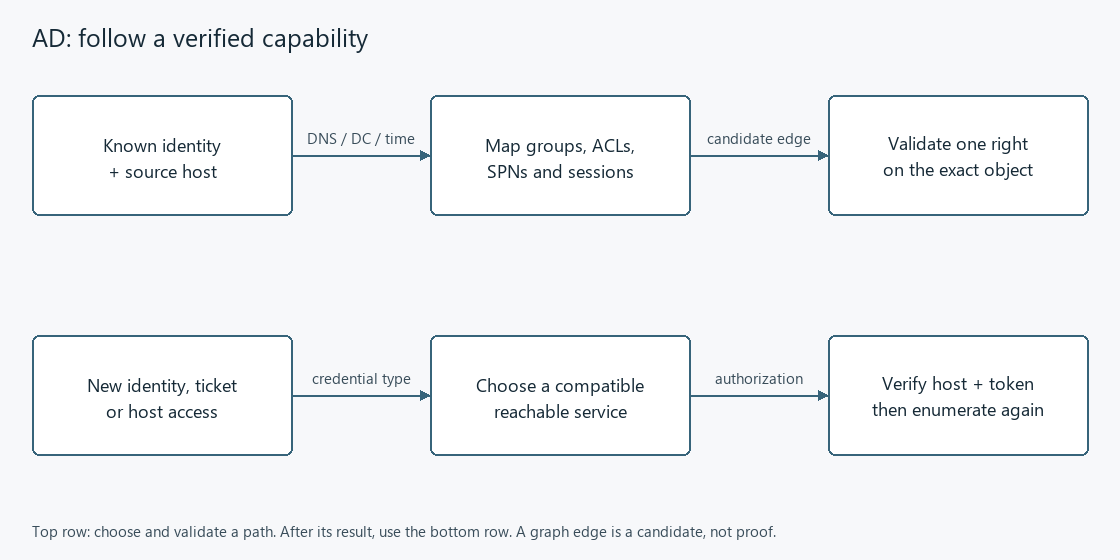
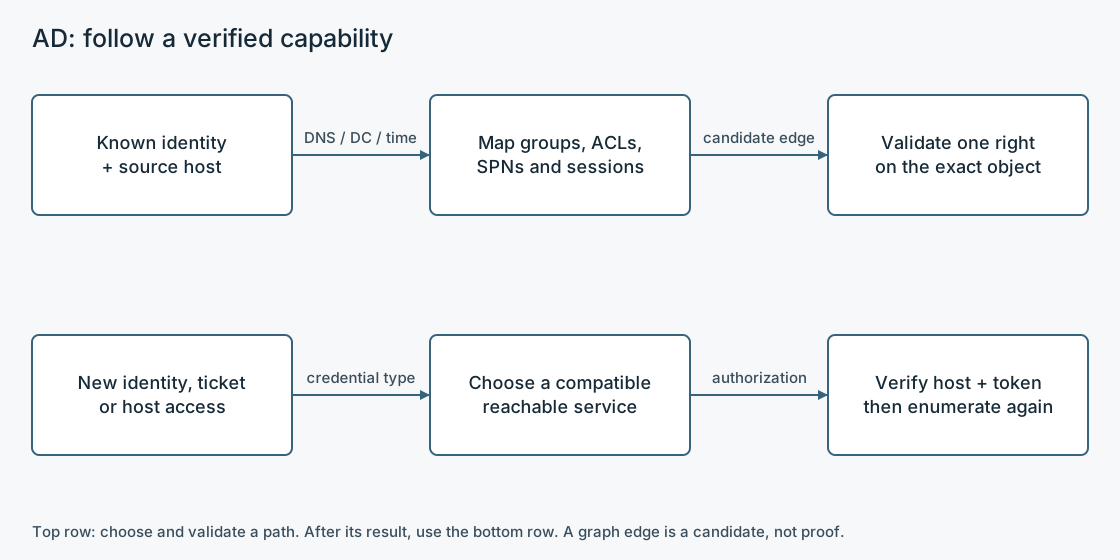
Prerequisite: one authorized domain identity and a route to the required DC/hosts. Record the source host, exact identity, domain FQDN, DNS server, DC FQDN/IP and time state before interpreting failures.
Coverage: mapping only. SPNs, ACLs, sessions and credentials are candidate transitions; ticket requests, directory changes, credential access and remote execution belong to the later Stage 06 procedures.
Exit: produce a ranked, manually checked map in the form
CONTROLLED IDENTITY → EFFECTIVE RELATIONSHIP → OBJECT/HOST → REACHABLE SERVICE → POSSIBLE NEW ACCESS.
9.6.1.1 AD capability transitions
9.6.1.2 Keep four maps, not one tool output
IDENTITY MAP: USER/COMPUTER -> DIRECT + NESTED GROUPS -> DIRECTORY RIGHTS
HOST MAP:     COMPUTER -> OS/ROLE -> LOCAL/REMOTE-ACCESS RIGHTS -> SESSIONS
ROUTE MAP:    SOURCE -> DNS/KDC/DC/HOST -> REQUIRED PORT/SERVICE
LEAD MAP:     EVIDENCE -> HYPOTHESIS -> MINIMUM VALIDATION -> NEXT BLOCK
Authentication, authorization, reachability and session presence are independent. A valid LDAP bind does not prove share access; SMB administration on one host does not prove directory privilege; a session edge does not prove retrievable credentials.
9.6.1.3 Establish identity, domain, DC, DNS and time
9.6.1.3.1 Domain-joined Windows source
whoami /all
echo %USERDNSDOMAIN%
echo %USERDOMAIN%
echo %LOGONSERVER%
nltest /dsgetdc:DOMAIN
nltest /dclist:DOMAIN
w32tm /query /status
[System.DirectoryServices.ActiveDirectory.Domain]::GetCurrentDomain()
Resolve-DnsName -Type SRV _ldap._tcp.dc._msdcs.DOMAIN
Resolve-DnsName -Type SRV _kerberos._tcp.DOMAIN
Decisive output: domain FQDN, DC FQDN/IP, current user SID/groups, DNS SRV answers and a plausible time source.
USERDOMAINcan be a NetBIOS label; prefer the DNS domain for LDAP/Kerberos.
9.6.1.3.2 Kali/off-domain source
dig +short SRV _ldap._tcp.dc._msdcs.DOMAIN @DC_IP
dig +short SRV _kerberos._tcp.DOMAIN @DC_IP
nxc smb DC_IP -d DOMAIN -u USER -p 'PASSWORD'
ldapsearch -x -LLL -H ldap://DC_HOST:389 -s base -b '' \
  defaultNamingContext configurationNamingContext rootDomainNamingContext dnsHostName
RootDSE is a directory-server metadata object. Reading it can reveal naming contexts even when anonymous subtree searches are denied. Convert
corp.exampletoDC=corp,DC=example; do not guess the base DN when RootDSE can supply it.
9.6.1.3.2.1 Remote Windows session and double-hop caveat
whoami /all
klist
dir \\DC_HOST\SYSVOL
A supplied credential may create the remote session without being delegated onward to the DC. If local identity commands work but access to a second host fails, distinguish a WinRM/PowerShell remoting credential-delegation problem from invalid credentials. An interactive RDP session, explicit credentials, /netonly network credentials or an off-domain LDAP client may create a different context; always record which identity is used locally and over the network.
9.6.1.4 Find domain identities and relationships with built-in utilities Native Windows baseline
Windows context: native commands first; RSAT only when installed.
net user /domain
net user USER /domain
net group /domain
net group "Domain Admins" /domain
net group "GROUP" /domain
net accounts /domain
nltest /domain_trusts /all_trusts
net view /domain
net view \\DC_HOST
These commands are broadly available but provide partial views. Expand interesting users and groups individually, trace nested groups rather than assuming memberOf is complete, and retain SIDs when names can collide across domains.
9.6.1.4.1 RSAT ActiveDirectory module, only when installed
Get-Command -Module ActiveDirectory
Get-ADDomain
Get-ADForest
Get-ADDomainController -Filter *
Get-ADUser -Filter * -Properties Enabled,Description,MemberOf,ServicePrincipalName,UserPrincipalName,PasswordLastSet,LastLogonDate,AdminCount
Get-ADGroup -Filter * -Properties GroupScope,GroupCategory,Members,Description
Get-ADGroupMember -Identity 'GROUP' -Recursive
Get-ADComputer -Filter * -Properties DNSHostName,OperatingSystem,OperatingSystemVersion,ServicePrincipalName,TrustedForDelegation,LastLogonDate
Get-ADTrust -Filter *
Get-AD* cmdlets require the RSAT ActiveDirectory module. Its absence on a client is normal; use ADSI, LDAP, PowerView or an off-domain client.
9.6.1.5 Query domain objects when the RSAT module is unavailable Built-in ADSI/DirectorySearcher fallback
Windows/.NET directory queries without RSAT; use the current network identity and correct base.
For automatic, explicitly scoped inventory, run the AD surface helpers with an explicit DC/domain. Collection runs by default, prints a bounded findings summary and saves a unique private evidence directory; -Preview displays checks without connecting. The helper preserves query failures, candidate clues, account-context limits and linked manual-validation handoffs without requesting roast material or changing directory objects.
For repeated queries, define LDAPSearch once inline, then use its purpose-labelled calls. The transparent one-off procedure below remains useful when no helper is loaded.
$root = [ADSI]'LDAP://RootDSE'
$base = [ADSI]("LDAP://" + $root.defaultNamingContext)
$searcher = New-Object System.DirectoryServices.DirectorySearcher($base)
$searcher.PageSize = 1000
$searcher.PropertiesToLoad.AddRange(@('samaccountname','userprincipalname','objectsid','memberof','serviceprincipalname','description','useraccountcontrol','pwdlastset','lastlogontimestamp'))
$searcher.Filter = '(&(objectCategory=person)(objectClass=user))'
$searcher.FindAll() | ForEach-Object { $_.Properties }
Change only the filter and requested attributes for another object class:
9.6.1.5.1 Groups
# Groups
$searcher.Filter = '(objectCategory=group)'
$searcher.PropertiesToLoad.Clear()
$searcher.PropertiesToLoad.AddRange(@('samaccountname','objectsid','member','grouptype','description'))
$searcher.FindAll() | ForEach-Object { $_.Properties }
9.6.1.5.2 Computers
# Computers
$searcher.Filter = '(objectCategory=computer)'
$searcher.PropertiesToLoad.Clear()
$searcher.PropertiesToLoad.AddRange(@('dnshostname','operatingsystem','operatingsystemversion','serviceprincipalname','useraccountcontrol','lastlogontimestamp'))
$searcher.FindAll() | ForEach-Object { $_.Properties }
PageSize = 1000asks for paged results; without paging, the server's result-size limit can silently produce an incomplete inventory. LDAP filters are data selection, not proof of access or exploitability.
9.6.1.6 Find useful directory objects using your domain credentials Authenticated LDAP from Kali
Directory connectivity and a supported authenticated query context; check base, filter and paging.
9.6.1.6.1 Discover the naming context
ldapsearch -x -LLL -H ldap://DC_HOST:389 -s base -b '' \
  defaultNamingContext configurationNamingContext rootDomainNamingContext dnsHostName
9.6.1.6.2 Identify domain principals and their memberships Users, groups and computers
ldapsearch -x -LLL -H ldap://DC_HOST:389 -D 'USER@DOMAIN' -W \
  -E pr=1000/noprompt -b 'DC=DOMAIN,DC=TLD' \
  '(&(objectCategory=person)(objectClass=user))' \
  sAMAccountName userPrincipalName objectSid userAccountControl memberOf description servicePrincipalName pwdLastSet lastLogonTimestamp adminCount
ldapsearch -x -LLL -H ldap://DC_HOST:389 -D 'USER@DOMAIN' -W \
  -E pr=1000/noprompt -b 'DC=DOMAIN,DC=TLD' \
  '(objectCategory=group)' sAMAccountName objectSid member groupType description
ldapsearch -x -LLL -H ldap://DC_HOST:389 -D 'USER@DOMAIN' -W \
  -E pr=1000/noprompt -b 'DC=DOMAIN,DC=TLD' \
  '(objectCategory=computer)' dNSHostName operatingSystem operatingSystemVersion servicePrincipalName userAccountControl lastLogonTimestamp
9.6.1.6.2.1 SPNs, trusts and GPO/OU context
# SPN-bearing accounts: mapping only; do not request tickets in this block.
ldapsearch -x -LLL -H ldap://DC_HOST:389 -D 'USER@DOMAIN' -W \
  -E pr=1000/noprompt -b 'DC=DOMAIN,DC=TLD' \
  '(&(objectCategory=person)(objectClass=user)(servicePrincipalName=*))' \
  sAMAccountName servicePrincipalName memberOf userAccountControl pwdLastSet
# Trusted-domain objects
ldapsearch -x -LLL -H ldap://DC_HOST:389 -D 'USER@DOMAIN' -W \
  -b 'DC=DOMAIN,DC=TLD' '(objectClass=trustedDomain)' \
  cn securityIdentifier trustDirection trustType trustAttributes
# OUs and GPO containers; correlate links before inferring host effect.
ldapsearch -x -LLL -H ldap://DC_HOST:389 -D 'USER@DOMAIN' -W \
  -E pr=1000/noprompt -b 'DC=DOMAIN,DC=TLD' \
  '(|(objectClass=organizationalUnit)(objectClass=groupPolicyContainer))' \
  distinguishedName displayName name gPLink gPOptions
9.6.1.6.3 LDAP failure router
| Result | Interpretation | Next action |
|---|---|---|
Invalid credentials (49) | Bind identity/secret/context failed; subcodes may refine the cause | Recheck UPN vs DOMAIN\USER, account state and exact secret; do not infer authorization |
Strong(er) authentication required / confidentiality required | Server policy rejects that bind/transport | Use the permitted LDAPS/StartTLS or Kerberos/SASL path; do not disable protections |
Size limit exceeded or suspiciously round count | Search is incomplete | Add paged results and narrow the base/filter |
| Referral/partial results | Search crossed a naming-context boundary | Query the referred domain/partition or compatible Global Catalog deliberately |
| Bind succeeds, search empty | Wrong base/filter, ACL filtering or genuinely no matches | Verify RootDSE base, test a known object and request fewer attributes |
| Works by IP, Kerberos fails | Route exists but name/SPN/DNS/time path is wrong | Use DC FQDN, AD DNS, correct realm and synchronized time |
9.6.1.7 Investigate domain objects and rights with PowerView PowerView: convenient manual breadth
Reviewed compatible PowerView loaded in the intended directory authentication context.
Import-Module .\PowerView.ps1
Get-Command -Module PowerView
Get-Domain
Get-DomainController
Get-DomainTrust
Get-DomainUser | Select-Object samaccountname,userprincipalname,description,memberof,serviceprincipalname
Get-DomainGroup
Get-DomainGroupMember -Identity 'GROUP' -Recurse
Get-DomainComputer | Select-Object dnshostname,operatingsystem,operatingsystemversion
Get-DomainUser -SPN | Select-Object samaccountname,serviceprincipalname,memberof
The original PowerSploit repository is archived. Course examples and forks may use legacy aliases such as Get-NetUser, Get-NetGroup, Get-NetComputer or Get-NetDomainTrust. Inspect Get-Command/Get-Help for the exact copy present rather than mixing generations.
9.6.1.8 Find readable domain files and configuration leads Shares, SYSVOL and NETLOGON
9.6.1.8.1 Inventory, then test the object
net view \\DC_HOST
dir \\DC_HOST\SYSVOL
dir \\DC_HOST\NETLOGON
nxc smb DC_IP -d DOMAIN -u USER -p 'PASSWORD' --shares
smbclient -L //DC_IP -U 'DOMAIN/USER'
smbclient //DC_IP/SYSVOL -U 'DOMAIN/USER' -c 'recurse ON; ls'
smbclient //DC_IP/SHARE -U 'DOMAIN/USER'
Inside smbclient, use ls, cd, get FILE and a harmless approved put only when write validation is needed. Share listing, share connection, file read and file write are separate permissions.
Inspect authorized readable policy/logon/deployment paths for scripts, configurations, backups, connection strings and legacy Group Policy Preferences XML containing cpassword. Selectively retrieve relevant files; do not bulk-copy a share merely because it is readable. A discovered secret returns to the credential-classification procedure.
9.6.1.9 Find service identities worth investigating Service accounts and SPNs
setspn -Q */*
setspn -L ACCOUNT
Get-DomainUser -SPN | Select-Object samaccountname,serviceprincipalname,memberof,useraccountcontrol,pwdlastset
Record account → service class/host/port → groups → password age/encryption/delegation clues → reachable service. An SPN means the account represents a Kerberos service identity; it does not mean the password is weak, the service is reachable or the account is privileged. Ticket acquisition/cracking is Block 11.
9.6.1.10 Identify directory objects you can control Directory ACLs and effective control
Get-DomainObjectAcl -Identity TARGET_OBJECT -ResolveGUIDs |
  Where-Object { $_.ActiveDirectoryRights -match 'GenericAll|GenericWrite|WriteDacl|WriteOwner|ExtendedRight|WriteProperty|Self' } |
  Select-Object ObjectDN,SecurityIdentifier,ActiveDirectoryRights,ObjectAceType,AceType,IsInherited,InheritanceType
PowerView normally exposes the trustee as SecurityIdentifier. Resolve that SID and trace controlled direct/nested membership. -ResolveGUIDs resolves operation GUIDs; it does not make every trustee a friendly account name. A blank projected column can mean the selected property is absent, not that an ACE has no trustee.
9.6.1.10.1 Compatible copy that actually emits IdentityReference
Use this projection only when inspecting the returned object confirms that the loaded implementation provides IdentityReference.
Get-DomainObjectAcl -Identity TARGET_OBJECT -ResolveGUIDs |
  Where-Object { $_.ActiveDirectoryRights -match 'GenericAll|GenericWrite|WriteDacl|WriteOwner|ExtendedRight|WriteProperty|Self' } |
  Select-Object ObjectDN,IdentityReference,ActiveDirectoryRights,ObjectAceType,AceType,IsInherited,InheritanceType
If the value is an unresolved SID, resolve it before applying the rule to a controlled principal.
| Candidate right | Possible transition to validate later | Missing proof now |
|---|---|---|
GenericAll | Broad object modification | Controlled trustee, target object class, applicable deny/inheritance and useful change |
GenericWrite / WriteProperty | Change one or more writable attributes | Exact attribute/object GUID and a transition that consumes it |
WriteOwner | Become owner | Ability to change the DACL afterward and use the resulting right |
WriteDacl | Add an ACE | Effective write-DACL right, planned narrow ACE and restoration |
AllExtendedRights / ForceChangePassword | Extended operation such as reset where applicable | Object class, exact extended right and downstream usefulness |
Self / validated write | Add self/member or another validated attribute where schema permits | Correct validated-write GUID and target type |
| GPO/OU control | Affect linked computers/users | Writable GPO component, effective link/scope, refresh/trigger and target placement |
An ACE is one rule. Effective access depends on trustee/group nesting, allow/deny semantics, inheritance, object-specific GUIDs and security descriptor scope. Do not perform the modification in this mapping block.
9.6.1.11 Find hosts where your identity may have useful rights Host-access candidates
Find-LocalAdminAccess
nxc smb TARGET -d DOMAIN -u USER -p 'PASSWORD'
nxc smb TARGET -d DOMAIN -u USER -p 'PASSWORD' --shares
Find-LocalAdminAccess is a broad candidate generator and can be noisy or blocked by firewall/RPC controls. Validate a selected host with the service you may actually use. NetExec's (Pwn3d!) indicates administrative SMB context according to that tool; it does not establish RDP, WinRM, WMI/DCOM or directory rights. RDP, WinRM, SMB/service control and WMI/DCOM each have different ports, services, policies and authorization.
9.6.1.12 Identify useful logged-on identities and verify the session evidence Sessions are volatile hints
Get-NetSession -ComputerName COMPUTER -Verbose
Get-NetLoggedon -ComputerName COMPUTER
PsLoggedOn.exe \\COMPUTER
Get-NetSession relies on workstation/session enumeration APIs that modern Windows may restrict. PsLoggedOn combines Registry profile evidence with NetSessionEnum; remote Registry access and sufficient rights are relevant, and querying can itself create a network-session entry. Therefore:
- empty/denied is inconclusive, not proof of no users;
- a session is a time-sensitive observation, not a durable ACL;
- a session matters only if the current identity can reach/control that host and a later credential/ticket technique applies;
- session presence does not prove credentials are resident, accessible or reusable.
9.6.1.13 Find and validate a useful domain attack path BloodHound: collect narrowly, rank, then validate
9.6.1.13.1 Current SharpHound CE
Low-noise directory baseline that avoids contacting every workstation:
.\SharpHound.exe --CollectionMethods DCOnly --OutputDirectory .\bh --ZipFileName domain-dconly.zip
Add host facts only when they can answer the next question:
.\SharpHound.exe --CollectionMethods LocalGroup --ComputerFile .\candidate-hosts.txt --OutputDirectory .\bh --ZipFileName candidate-localgroups.zip
.\SharpHound.exe --CollectionMethods Session --ComputerFile .\candidate-hosts.txt --Loop --LoopDuration 00:10:00 --OutputDirectory .\bh --ZipFileName candidate-sessions.zip
SharpHound with no collection flag uses its broader default, including directory data plus local-group/session attempts. All performs every supported method; it is not the first response to an unanswered narrow question. Import the output ZIP into a compatible BloodHound CE deployment and verify node/edge counts and ingestion errors.
9.6.1.13.1.1 Collector variants and compatibility
# Inspect the actual collector before using copied syntax.
.\SharpHound.exe --help
For the current Kali CE collector, use the noninteractive directory-first command below. Legacy bloodhound-python is not its CE command/schema.
# Legacy/course PowerShell collector; use only with a compatible legacy deployment.
Import-Module .\SharpHound.ps1
Invoke-BloodHound -CollectionMethod All -OutputDirectory .\bh -ZipFileName legacy.zip
Use the collector version intended for the BloodHound deployment. bloodhound-python, legacy SharpHound PowerShell and current SharpHound CE are alternatives with different schemas/features, not interchangeable command spellings.
9.6.1.13.2 Noninteractive Kali first pass
Use one valid domain identity and scoped DC/SMB connectivity. Start in a fresh private directory so graph output and reports do not mix identities. DOMAIN is the DNS domain; DOMAIN_NETBIOS is its short name, DC_HOST the DC FQDN, and TARGET one approved SMB host. No menu input is required.
mkdir -p ~/oscp/work/TARGET/evidence/ad-first-pass
cd ~/oscp/work/TARGET/evidence/ad-first-pass
bloodhound-ce-python -d DOMAIN -u USER -p 'PASSWORD' -dc DC_HOST -ns DC_IP -c DCOnly --disable-autogc --zip
ldapdomaindump -u 'DOMAIN_NETBIOS\USER' -p 'PASSWORD' -o ldap-inventory ldap://DC_IP
bloodyAD --host DC_HOST --dc-ip DC_IP -d DOMAIN -u USER -p 'PASSWORD' get writable --detail --partition DOMAIN > writable.txt
nxc smb TARGET -d DOMAIN -u USER -p 'PASSWORD' --shares --no-admin-check --log shares.log
Choose: the graph covers groups, trusts, object properties, ACLs and containers; ldapdomaindump adds readable inventory; bloodyAD reports domain-partition effective writable attributes/security descriptors/child classes; NetExec checks the selected host's shares. Skip redundant inventory when the graph already answers the question.
Version gate: the NetExec line requires help documenting
--file-write-check(leave it off) and--no-admin-check. Its default opens existing share roots with access masks, without creating files. The latter skips SCM administration probing. The bloodyAD line requires--partitionsupport. Local tool databases, arguments and output contain private information.Interpret:
DCOnlybypasses member-computer enumeration, not all DC/GC/DNS discovery. LDAP inventory can follow referrals. A writable-rights result is not a write; an SMB access-mask result is not proof of actual file creation. No remote command, password change, LDAP modification, certificate enrollment or roasting feature is selected here. Logons and audit events still occur.
9.6.1.13.2.1 Older NetExec with --no-write-check, including v1.4.0
nxc smb TARGET -d DOMAIN -u USER -p 'PASSWORD' --shares --no-write-check --log shares.log
Use this only when installed help supports the older flag. Bare --shares in that release creates/deletes temporary artifacts. This form skips write testing, but the old login path can still probe SCM permissions. Filtering displayed shares to READ is not a substitute for disabling the write test.
Do not use linWinPwn --auto as a substitute for this selection: its automatic chain has additional attack behavior. Its menu-based all,LoggedOn collector adds host RPC and remote-registry access that can trigger RemoteRegistry startup. The direct baseline also removes the wrapper's startup Nmap scan and conditional password-repair prompts. Authentication-method fallback can cause multiple authentication exchanges; stop and diagnose a failed credential rather than repeatedly running all collectors.
Sources: BloodHound.py CE, ldapdomaindump, bloodyAD writable query, NetExec share enumeration. A future tool/dependency version needs renewed behavior checks; these commands are reference material, not a claim of target execution or explicit OffSec tool endorsement.
9.6.1.13.3 Analyze in this order
- Mark only identities/hosts actually controlled. A low-privilege session on a host does not make the host itself fully owned.
- Inspect the controlled principal's direct and nested group memberships and outbound object-control edges.
- Inspect reachable computers where it has local admin, RDP, WinRM/DCOM or other applicable rights.
- Inspect high-value goals and shortest paths only as hypothesis generation.
- Classify each selected edge:
- directory/static-ish: group, ACL, GPO, OU, trust;
- host-derived: local group or user right;
- volatile: session;
- route-dependent: the required host/service must be reachable now.
- Reproduce the minimum important relationship manually before handing it to Block 11 or 12.
9.6.1.14 Rank candidate paths by evidence and missing prerequisites Candidate ledger and path ranking
ID | CONTROLLED PRINCIPAL | RELATIONSHIP | TARGET | SOURCE EVIDENCE
   | EFFECTIVE? | ROUTE/SERVICE | VOLATILITY | EXPECTED TRANSITION
   | MINIMUM VALIDATION | STATUS | NEXT BLOCK
Rank candidates by:
- confidence that the relationship is effective;
- deterministic value of the resulting identity/access;
- route and service availability;
- stability versus volatile session timing;
- reversibility and impact;
- number of unsupported assumptions.
Prefer a validated readable share/credential clue or direct object right over a multi-edge path built from stale sessions and unreachable hosts.
9.6.1.15 Choose the next check from the failure you observed Failure routing
| Symptom | Most likely layer | Next test |
|---|---|---|
| DC IP reachable, domain names fail | DNS/name layer | Query AD DNS SRV/A records; use FQDN; check source resolver |
| Kerberos fails while SMB/LDAP by IP works | Name/SPN/time/KDC route | FQDN, realm, clock, UDP/TCP 88 and ticket state |
| Domain identity works locally but not from remote shell to DC | Credential delegation/double hop | klist, SYSVOL access, explicit/off-domain context |
| LDAP bind succeeds but results are incomplete | Search scope/paging/ACL | RootDSE base, paging, known-object query, requested attributes |
| Share appears but files deny access | Object authorization | Enter share and test exact directory/file; separate read from write |
Find-LocalAdminAccess returns nothing | Enumeration limitation or no rights | Test one evidence-backed host/service manually |
| Session enumeration is empty/denied | API/rights/firewall/time limitation | Treat inconclusive; retry only where host access/value supports it |
| BloodHound path exists but host is unreachable | Route/service layer | Move to Stage 07 before identity attacks |
| BloodHound import is empty/odd | Collection/schema/ingest issue | Inspect collector logs/ZIP, domain/DNS, method and version compatibility |
| ACL appears powerful but cannot be tied to current user | Trustee/nesting/scope problem | Resolve SID, nested groups, deny/inheritance and target object GUID |
9.6.1.16 Continue with the capability your result enables Handoffs
- SPN, roastable/no-preauth candidate, useful ACL/GPO right, readable secret or privileged-host credential opportunity → identity transitions and object control, credential access, or object control.
- Password/hash/ticket plus validated host authorization → lateral movement.
- Required internal host/service unreachable → pivoting and tunneling.
- Any new identity, host, route, subnet or domain → repeat the relevant mapping branches.
9.6.1.17 Tooling for this section
| Tool | Choose it when | Requirements | Baseline | Decisive output | Failure cue |
|---|---|---|---|---|---|
whoami, net, nltest, setspn, DNS/time tools | Always on a domain Windows source | Domain context; command availability varies | Sections 2–3 and 8 | Exact identity/domain/DC/group/SPN facts | Partial output; use LDAP/ADSI for breadth |
| ADSI/DirectorySearcher | RSAT/PowerView is absent | Windows PowerShell/.NET and DC reachability | Section 4 | Paged objects with requested attributes | 1000-ish limit/empty output: paging, base, filter or rights |
ldapsearch | Off-domain/raw LDAP control is useful | DC FQDN/IP, base DN, credentials for subtree queries | Section 5 | Successful bind and complete paged results | Error 49, stronger auth, referral or size limit |
| PowerView | Fast manual AD relationship queries | Known script/version and Windows PowerShell | Section 6 | Named object/group/ACL/host candidates | Archived/fork syntax and blocked APIs require native fallback |
| NetExec | Validate SMB identity, shares or selected admin candidate | Kali, route to service, credentials | nxc smb TARGET -d DOMAIN -u USER -p 'PASSWORD' --shares | Auth line, share rights, optional SMB admin marker | SMB result does not prove other protocols |
smbclient | Manually inspect a specific share/object | SMB route and credentials | smbclient //TARGET/SHARE -U 'DOMAIN/USER' | Exact list/read/write result | Listing and file access can differ |
| PsLoggedOn | Check one justified host for users | Windows binary; remote Registry/session access | PsLoggedOn.exe \\COMPUTER | Local-profile/network-session entries | Access/Remote Registry limitations; query adds an artifact |
| SharpHound CE + BloodHound CE | Graph directory/host relationships | Compatible collector/deployment, DNS/DC route, authorized collection | SharpHound.exe --CollectionMethods DCOnly ... | Ingested nodes/edges and candidate paths | Collection errors, stale sessions, incompatible schema |
bloodhound-python / LDAPDomainDump | Linux-side fallback/reporting | Kali packages, LDAP/DNS route, credentials, compatible output expectations | Inspect --help; use only the needed collection/report | Directory relationships/HTML or BloodHound output | Feature/schema differences from SharpHound CE |
9.6.1.18 Kerbrute — confirm candidate names before password testing
Use with the real domain and reachable KDC. Names generated from emails/wordlists remain candidates until verified.
9.6.1.18.1 kerbrute userenum -d DOMAIN --dc DC_IP --delay 1000 -o valid-users.txt users.txt
kerbrute userenum -d DOMAIN --dc DC_IP --delay 1000 -o valid-users.txt users.txt9.6.1.18.2 A separate password test, only after reading lockout policy and attempt history
# A separate password test, only after reading lockout policy and attempt history
kerbrute passwordspray -d DOMAIN --dc DC_IP --delay 1000 --safe \
  users.txt 'PASSWORD'
Read: a valid principal is not a valid password or host access. Password pre-auth failures can count toward lockout; --safe stops on a reported lock but does not guarantee that no lockout occurs. Confirm a reported login with the relevant SMB/WinRM/LDAP client and keep the account scope explicit. DNS, time and a correct realm remain prerequisites.
Sources: upstream 1.
9.6.1.19 RustHound-CE — a cross-platform BloodHound collector
Use a compatible RustHound-CE build when collecting directory relationships from Linux or when a SharpHound binary is unsuitable. CE output belongs in BloodHound CE, not Legacy.
9.6.1.19.1 rusthound-ce -d DOMAIN -u 'USER@DOMAIN' -p 'PASSWORD' -f DC_HOST -z
rusthound-ce -d DOMAIN -u 'USER@DOMAIN' -p 'PASSWORD' -f DC_HOST -z9.6.1.19.2 When the directory requires LDAPS and the TLS/name prerequisites are met
# When the directory requires LDAPS and the TLS/name prerequisites are met
rusthound-ce -d DOMAIN -u 'USER@DOMAIN' -p 'PASSWORD' -f DC_HOST --ldaps -z
Read: import the generated archive, identify the exact useful edge and verify its underlying permission or host access. Directory collection does not establish a live privileged session on a workstation. LDAP/TLS, DNS or credential errors must be repaired before treating an incomplete graph as evidence of no path.
Sources: upstream 1.
9.6.1.20 GPP cpassword — recover a candidate from readable SYSVOL XML
Use when an accessible preference XML contains a cpassword attribute. Search the SYSVOL files actually read/downloaded with the accepted account.
grep -Rni 'cpassword' ./sysvol
gpp-decrypt 'C_PASSWORD'
Read: keep the XML's username, host/policy scope and path beside the recovered value. Old preference files can contain stale credentials. Validate the matching account on a relevant service; a decrypted string is not proof of current domain or local-admin access. A modern domain need not contain these older preference secrets.
Sources: upstream 1.
9.6.1.21 Kerberos clock skew — compare UTC and use a working time source
Use when tickets fail with a skew error or the DC/workstation clock comparison is inconsistent. A timezone label is not the UTC clock value.
9.6.1.21.1 date -u
date -u
nmap -Pn -p 445 --script smb2-time DC_IP
9.6.1.21.2 If this DC is a confirmed reachable NTP source, correct the attack workstation
# If this DC is a confirmed reachable NTP source, correct the attack workstation
sudo ntpdate -u DC_IP
date -u
Read: retry the same ticket/service request after verifying the actual UTC difference. If the clock jumps back, identify the competing host/VM/time-sync source instead of repeatedly changing timezone settings. NTP silence can be filtering or an unavailable time service; it is not evidence that the KDC's displayed time was wrong.
Sources: upstream 1 · upstream 2.
9.6.1.22 Sources
- Supplied PEN-200, Chapter 22, pp705–757.
- OffSec OSCP+ Body of Knowledge
- OffSec OSCP Exam FAQ
- SpecterOps SharpHound CE and collection flags
- Microsoft RootDSE and DirectorySearcher
- Microsoft PsLoggedOn
- NetExec share enumeration and LDAP query
- OpenLDAP Administrator's Guide
- PowerSploit PowerView (archived)
- getSH Active Directory route, source snapshot
e1f62dd - Hexdump Active Directory module and consolidated cheatsheet. The live AD module was still a
TODOwhen checked; its minimal legacy collection cues were independently updated against current SharpHound documentation.